Host an HTML file on SharePoint? Here is how.
If you uploaded an .html file to SharePoint and it downloaded instead of opening, or your JavaScript stopped working, you are not doing anything wrong. SharePoint is built to stop exactly that. The fix takes two steps: publish the file on yapp.page, which turns it into a live link in about two seconds, then embed or link that page back into SharePoint. This guide covers why the direct routes fail and the exact clicks for the one that works.
Updated August 2026. Tested on a Microsoft 365 Business tenant.
Host my HTML page →01 Why SharePoint won't render your HTML
SharePoint is a document and content platform, not a web host for arbitrary HTML. Three defaults get in the way, and none of them has a checkbox you can simply flip:
- HTML files download instead of displaying. A document library hands
.htmlfiles to the browser as a download. The modern library may show a static preview overlay when you click the file, but a preview locked inside your library is not a page anyone can visit. - Custom scripts are blocked by default. Inline JavaScript and most embedded code is stripped or refused, so an interactive page will not run when pasted into SharePoint.
- Outside pages cannot be embedded until an admin allows them. The Embed web part only accepts URLs from a per-site allow-list, which surprises people who expected to just paste a link.
The Script Editor part that older guides mention is gone from modern sites, and the File Viewer shows Office documents and PDFs, not HTML. For a real interactive page with a link you can share, SharePoint cannot do it alone. (This guide covers SharePoint Online, the Microsoft 365 version; on-premises SharePoint Server behaves differently.)
02 How to embed an HTML page in SharePoint
Four steps, about five minutes end to end, one of them for a site admin. yapp.page does the part SharePoint refuses to do: it serves your HTML as a real page. You drop the file, you get a live https link in about two seconds, scripts running, and the link stays the same when you update the content. SharePoint stays the place people start from; the page itself just works.
Publish the HTML file
Drop your .html file on yapp.page. If it has CSS, images or JavaScript, drop the whole folder or a ZIP with index.html at the root. You get a live https URL like yourname.yapp.page in about two seconds, with the scripts intact.
Add the page host to the site's allow-list
Paste the URL into the Embed web part on a fresh site and you will most likely see this:
"Embedding content from this website isn't allowed, but your admin can change this setting. They will need to add yourname.yapp.page to the list of sites that are allowed."
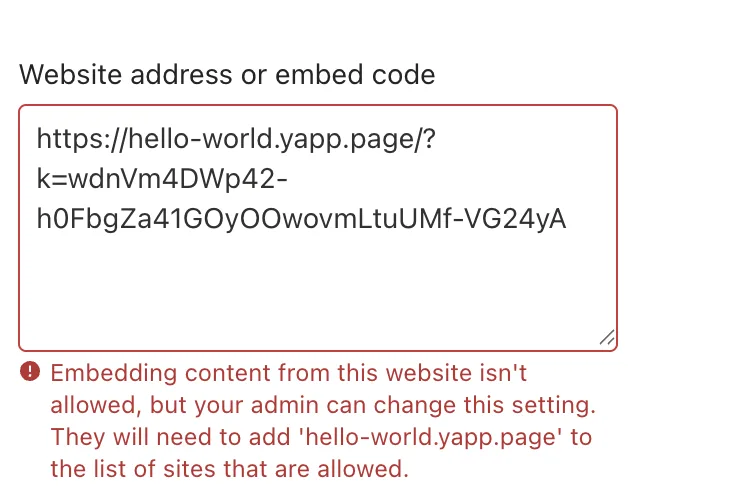
That is normal, and it is not about yapp.page specifically. Every domain outside Microsoft's default list gets the same treatment. A site collection administrator adds it in a minute:
Settings (the cog), then Site information, then View all site settings, then HTML field security under Site Collection Administration. Choose "allow contributors to insert iframes only from the following domains", type the host, and select Add, then OK.
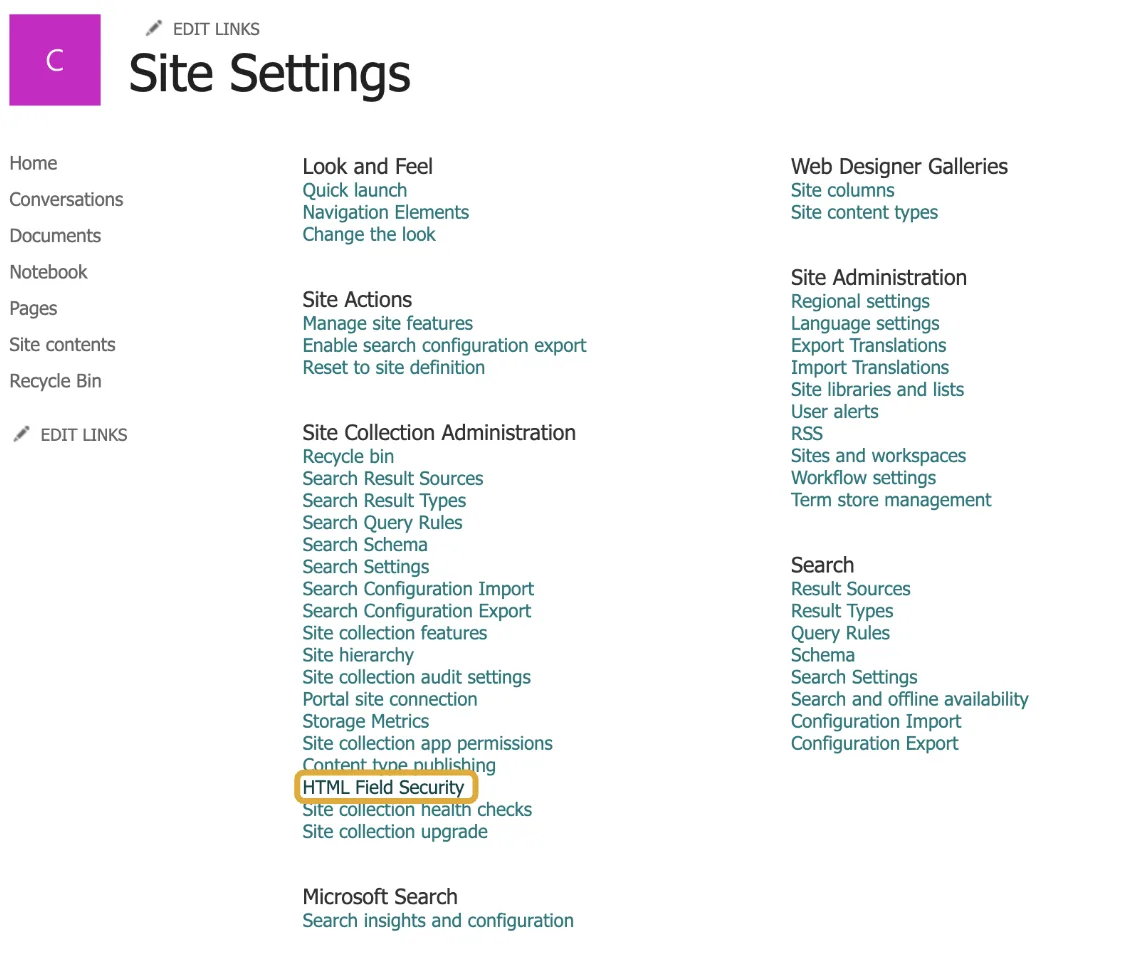
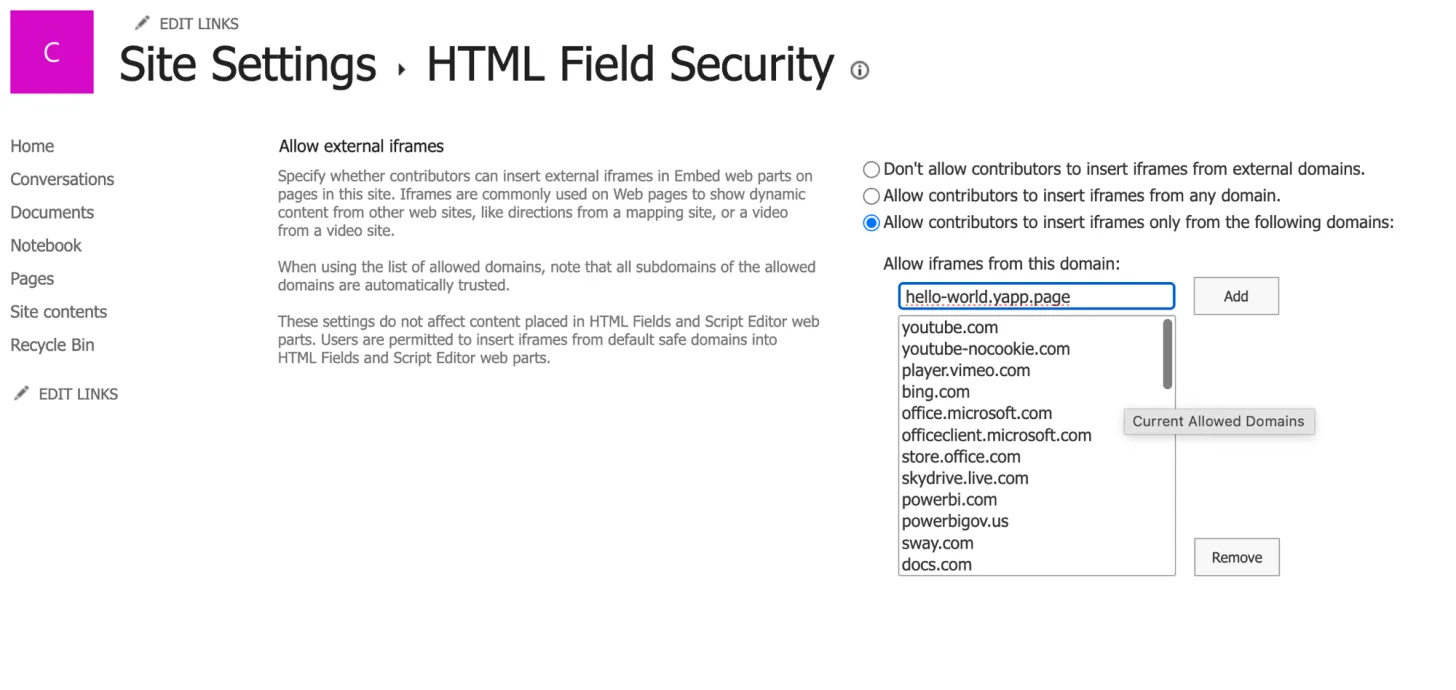
The error names the full host of your page, and adding exactly that is the cautious choice. There is a shortcut, though: SharePoint's settings page notes that subdomains of an allowed domain are trusted automatically, so an admin who adds yapp.page once has covered every page you embed after that. And on a paid plan you can point your own domain, say handbook.yourcompany.com, at the page, so the allow-list carries a name your company already owns.
Embed it, or just link it
With the host allowed, add the Embed web part and paste either the page URL on its own or this iframe snippet, swapping in your page's address:
The iframe form lets you set the height; put in roughly your page's real height and let SharePoint's "Resize to fit the page" toggle handle the width.
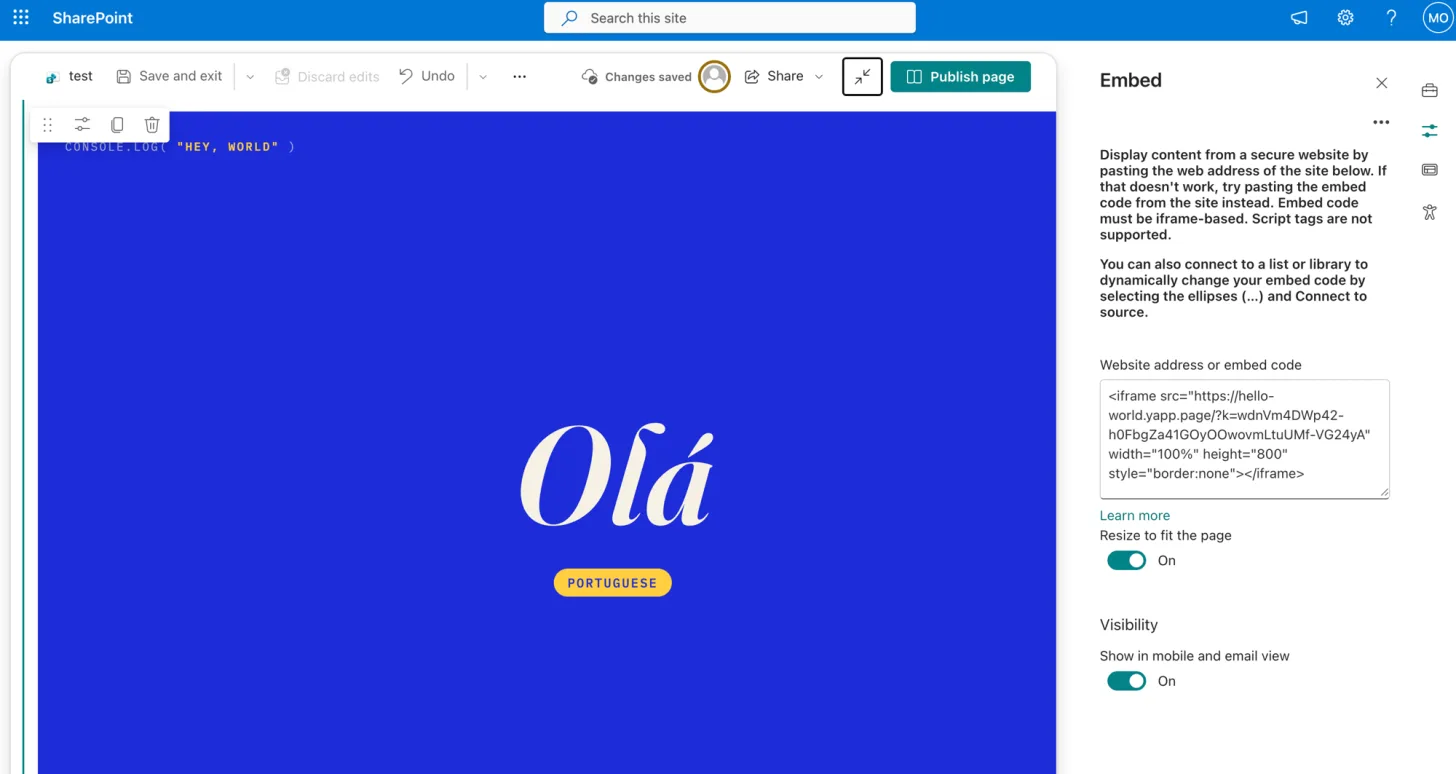
If your admin will not allow the domain, add a plain link instead. Links need no allow-list and open the working page in a new tab, which is often the faster approval to get. And if your team lives in Microsoft Teams rather than the intranet, the same page pins there as a tab; our Teams guide has those steps.
Update without touching SharePoint again
When the content changes, update the page on yapp.page and the URL stays the same, so the embed and every shared link keep pointing at the latest version. No second allow-list request, no re-upload into the library.
03 Trying to keep it inside SharePoint instead?
If you would rather avoid an outside host, here is an honest read on the in-platform routes.
| Route | Does it work? | The catch |
|---|---|---|
Upload .html to a document library | No | Downloads instead of rendering. No library setting changes this. |
| Site Assets library plus a sharing link | No | An old forum favourite. On current SharePoint Online the sharing link previews or downloads the file just like a library link; it does not render the page. |
Rename .html to .aspx | Sometimes | Needs custom script switched on, and that setting resets itself to blocked after about 24 hours. Your page works today and breaks tomorrow. |
| Site Pages library | Partly | Better than a document library for .aspx, but your own CSS and JavaScript are still restricted. |
| Text and image web parts | For simple content | Basic formatting only. No custom scripts, no real layout control. |
| SharePoint Framework (SPFx) | Yes | The supported route for custom code, and a developer toolchain plus an admin deployment. Heavy for one HTML page. |
| Host it and embed the URL | Yes | One allow-list entry per host, added by a site collection admin. Covered above, step by step. |
04 What your security team will ask
Putting work content on an outside host is a fair question to raise. Straight answers:
- Does it touch our Microsoft 365 tenant? No. The page lives outside your tenant, and SharePoint only embeds or links to it, the same as any other external website. There is no app to install, no permissions to grant, and no access to your SharePoint or Microsoft 365 data.
- Who can open the page? Anyone with the link, unless the page has a password. The address is not guessable, but it is not a permission system either, so treat an open page like a link in a document library shared with "anyone with the link". With a password set, the page is private: only people who have the password can open it.
- Is it visible to search engines? Pages are not blocked from crawlers, so treat a published page as publicly reachable. Do not put anything on it you would not put on your public website.
- Where does it run? Pages are stored in Hetzner data centres in Germany, run by Reamber GmbH, and delivered through a global CDN with more than 300 locations, so the embed loads fast worldwide. There is a data processing agreement and a privacy policy your team can read before approving anything.
- Can I lock it down? Paid plans can put a password on a page. See the note below about passwords inside an embed.
- Will it carry someone's branding? Free pages show a small "Made with yapp.page" badge, which is visible to everyone who opens the embed. Paid plans remove it.
05 How long the link lives, and what it costs
Worth knowing before you paste a URL into an intranet page that people will use for months.
| No account | Free account | Paid | |
|---|---|---|---|
| Link stays live | 30 minutes | 30 days | Never expires |
| Pages | Trial only | 5 | 20 and up |
| Size per page | 5 MB | 5 MB | 50 MB |
| Password protection | No | No | Yes |
| Your own domain | No | No | Yes |
| "Made with yapp.page" badge | Shown | Shown | Removed |
The 30 minute trial is there so you can check that your page renders before signing up. It is not the right link to paste into SharePoint. Sign in first, and if the page is going to sit on an intranet page for a year, a plan that never expires is the honest choice. Generated documentation, exported reports and help output often run past 5 MB, so check the size before you commit. See plans →
06 Frequently asked questions
Can SharePoint host HTML files?
It can store an .html file, but it will not serve it as a live page. SharePoint Online downloads the file instead of rendering it, and custom scripts are off by default. To get a working page you host the HTML elsewhere and link or embed it back into SharePoint.
Why does my HTML file download instead of opening?
SharePoint hands library files to the browser as downloads as a security measure, so it saves your .html rather than displaying it. There is no library setting that turns the file into a rendered page.
Why isn't my JavaScript running in SharePoint?
Custom script is disabled by default, so inline and embedded JavaScript is stripped or refused. An admin can switch it on, but Microsoft resets it to blocked after about 24 hours.
What does "Embedding content from this website isn't allowed" mean?
The Embed web part checks the URL against a per-site allow-list. Your site collection administrator adds the host under Site settings, HTML field security. SharePoint's own error message names the exact host to add. Adding the parent domain also works, because subdomains of an allowed domain are trusted automatically.
Does renaming the file to .aspx fix it?
Sometimes, and not durably. It depends on custom script being enabled, which resets itself roughly every 24 hours, so pages that worked yesterday start downloading again.
What is the easiest way to host the page outside SharePoint?
Drop the file on yapp.page. You get a live https URL in about two seconds. Publishing without an account gives you a 30 minute trial link, a free account keeps the page for 30 days, and a paid page never expires.
Related
Host an HTML file online, free →
How to share an HTML file as a link →
Host an HTML page in Microsoft Teams →
Host an HTML file on Google Drive →
A simpler GitHub Pages alternative →
Simpler Netlify alternative →
Simpler Replit alternative for hosting →
Free static website hosting →
How to publish an HTML website →
Share a PDF online, free →
Set up yapp.page with your AI client →